Redwing: A Retro Script That Demands Precision
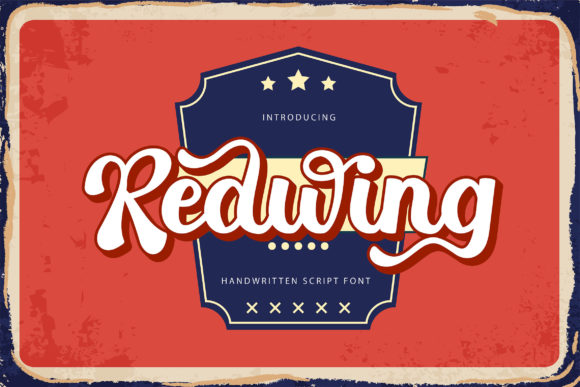
If you are looking for a typeface that instantly transports your audience back to the golden age of elegance, Redwing is a standout choice. This retro-styled and chic script font offers more than just pretty curves; it provides a distinct personality that can elevate branding, invitations, and editorial layouts. However, simply downloading a font file does not guarantee success. Many designers assume that because a script looks good in isolation, it will perform well in a complex layout. The reality is often different.
The allure of Redwing lies in its fluidity and charm, but its true power comes from understanding how it functions technically. It is PUA encoded, which stands for Private Use Area. While this feature sounds like a minor technical detail, it is actually the key to unlocking the font's full potential. Without understanding this encoding method, you might find yourself struggling to access specific swashes or alternate characters, leading to frustration and subpar design results.
Understanding the Power of PUA Encoding
One of the most common misunderstandings among beginners involves how they interact with specialized fonts like Redwing. You might expect to see every single glyph sitting neatly in your standard character map or keyboard shortcuts. When you open a basic text editor and try to type out a sentence, you will quickly realize that Redwing does not behave like Arial or Helvetica. This is where the PUA encoding becomes critical.
Because Redwing utilizes the Private Use Area, accessing all glyphs and swashes requires a specific workflow. If you do not configure your software correctly, you may miss out on the ligatures and flourishes that make the font so distinctive. The result is a design that feels incomplete, as if the designer forgot to include the finishing touches. Instead of a seamless flow, your text might look disjointed or plain, failing to convey the intended vintage sophistication.
To avoid this pitfall, you must learn to use OpenType features within your design application. Most professional tools like Adobe InDesign, Illustrator, or even modern web editors have built-in interfaces for accessing these special characters. Do not rely on trial and error with your keyboard. Instead, open the Glyphs panel or the Character Map tool provided by your operating system. Look for the "Swashes" and "Alternates" options. By manually selecting these variations, you ensure that every letter connects beautifully and that the decorative elements align perfectly with the baseline.
The Trap of Over-Decoration
Even when you successfully access the correct glyphs, there is another mistake that plagues many users of elegant scripts. The temptation to use every available swash and flourish in a single headline is strong. After all, why wouldn't you want to show off everything you paid for? Unfortunately, using too many decorations at once creates visual noise. It distracts the reader and makes the text difficult to scan.
When you apply excessive swashes without a clear hierarchy, the message gets lost. A marketing email or a blog post header needs to be read quickly. If the eye has to jump around trying to decipher which letters are connected and which are separate, the communication breaks down. The chic nature of Redwing should enhance readability, not hinder it. A balanced approach uses swashes strategically to highlight specific words or initials, leaving the rest of the text clean and legible.
Consider the context of your project. For a wedding invitation, a high level of decoration is appropriate. For a product label or a website navigation menu, restraint is key. The best designs use the font's capabilities to guide the viewer's eye, not to overwhelm them. Think of the swashes as seasoning in a dish; a little bit adds flavor, but too much ruins the meal.
Evaluating Compatibility Before You Buy
Before you decide to incorporate Redwing into your next project, it is essential to check the technical compatibility. Many professionals rush into purchasing a font only to discover later that their current workflow cannot support it efficiently. While Redwing is designed for versatility, the PUA encoding means it relies heavily on software that supports advanced OpenType features.
If you are a freelancer working with clients who use older versions of design software, you might face delivery issues. Your client may see a standard font instead of the intended script if they do not have the proper version installed. To prevent this, always verify the font format. Ensure you have the latest version of the font file, typically .OTF, which offers the best support for PUA characters. Additionally, test your design on different devices before finalizing the project. What looks perfect on your high-resolution monitor might render poorly on a mobile device if the font is not properly embedded or linked.
Another overlooked detail is licensing. Some creators assume that because a font is stylish, it can be used freely for commercial projects. Always read the license agreement carefully. Using a font for a large-scale campaign without the correct commercial license can lead to legal trouble and financial penalties. Check whether the license covers web embedding, print runs, and merchandise. Understanding these boundaries protects your business and ensures you are using Redwing ethically.
Making the Right Choice for Your Brand
When evaluating whether Redwing fits your brand identity, look beyond the initial aesthetic appeal. Does the font match the tone of your message? A retro script is excellent for businesses that value tradition, craftsmanship, or personal touch, such as bakeries, boutiques, or consulting firms. However, if your brand focuses on speed, technology, or minimalism, this font might send the wrong signal.
Compare Redwing with other options in the market. Look at the weight distribution, the x-height, and the spacing between letters. A font that is too tight or too loose can cause alignment issues when paired with body text. Ensure that the contrast between the script and your supporting typography is harmonious. Good design is about balance, not just picking a pretty font. Take the time to create mockups with different combinations to see how the text interacts with images and white space.
Ultimately, the goal is to create a cohesive visual language. By mastering the PUA encoding, avoiding over-decoration, and checking compatibility early, you can leverage the endless possibilities of Redwing. This font is a powerful tool for anyone willing to invest the time to understand its nuances. Whether you are a seasoned graphic designer or a small business owner creating your first logo, taking a thoughtful approach will yield far better results than rushing through the process.
Don't let technical hurdles or poor execution hold you back. With the right knowledge, Redwing can become the centerpiece of your most successful designs, delivering the retro charm and professional polish your projects deserve.