Onion: The Sweet Script That Elevates Your Design Without the Fuss
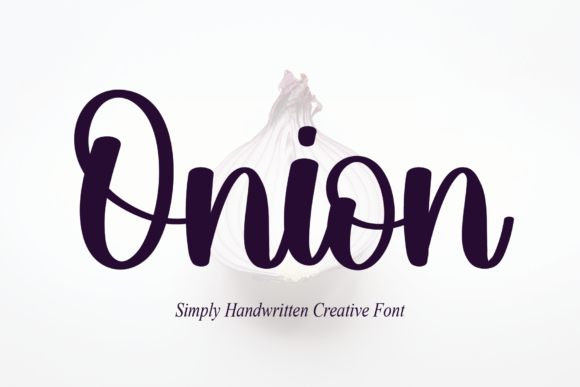
If you have ever struggled to find a font that balances whimsy with genuine elegance, you are likely looking for Onion. This sweet, flowing, and thin script font is designed to make characters dance along the baseline, adding a distinct luxury spark to any project. Unlike rigid block letters or overly decorative typefaces that demand attention through chaos, Onion whispers sophistication. It is the kind of tool that transforms a simple flyer into an invitation to an exclusive event or turns a standard blog post header into a piece of art.
However, just because a font looks beautiful in a preview window does not mean it will perform well in your final design. Many creators, from freelancers to small business owners, rush to download popular scripts without understanding their specific mechanics. When you choose a font like Onion, you are making a strategic decision about readability, tone, and user experience. Let us explore how to use this unique typeface effectively while avoiding the common pitfalls that can ruin even the most promising layout.
The Allure of a Dancing Baseline
What sets Onion apart from other script fonts is its dynamic nature. The description of characters "dancing along the baseline" is not just marketing fluff; it refers to the subtle vertical oscillation of the letterforms. This movement creates a sense of rhythm and flow that mimics natural handwriting but with a polished, professional finish. For marketers and bloggers, this implies a brand voice that is approachable yet refined.
When applied correctly, this font adds a layer of perceived value to your work. A wedding invitation, a boutique product label, or a personal portfolio can instantly feel more expensive when set in Onion. The thin strokes require a certain level of confidence in your design skills, as they can disappear if the background is too busy or the contrast is too low. The goal is to let the font shine without overwhelming the viewer.
Why Beginners Often Misunderstand Thin Scripts
One of the most frequent mistakes I see among beginners is underestimating the impact of weight and size. Because Onion is a thin script, it naturally has less visual weight than a bold sans-serif or a heavy serif. If you place this font on a light gray background or use it at a small point size, it becomes nearly invisible. This leads to poor communication and frustrates your audience, who may struggle to read your message.
The Correction: Always test your font choices against high-contrast backgrounds. If you are using Onion for body text, ensure the line height is generous to prevent the letters from touching. For headings, increase the size significantly to maintain legibility. Remember, luxury often relies on negative space; do not crowd the text.
Common Pitfalls in Downloading and Licensing
Before you even open your design software, there is a critical step where many people go wrong: licensing. The market for fonts is flooded with free downloads, but not all sources are created equal. Some websites offer "free" versions of premium fonts like Onion that come with hidden malware or incomplete character sets. Others provide licenses that restrict commercial use, which can lead to legal trouble for entrepreneurs and businesses.
- Incomplete Character Sets: A cheap or pirated version might lack essential punctuation, numbers, or special symbols. You might find yourself unable to write a price tag or a date, forcing you to switch fonts mid-project and ruining your visual consistency.
- Commercial Restrictions: Using a personal license for a client project is a violation of terms. If you are a freelancer or agency owner, always verify that your license covers commercial usage before you start billing your client.
- File Corruption: Downloading from unverified sources can result in corrupted files that cause your design software to crash or display garbled text.
To avoid these issues, purchase directly from reputable foundries or trusted marketplaces. While this might cost slightly more upfront, it guarantees you receive the full package, including web-font formats (WOFF/WOFF2) and proper technical support. This investment protects your reputation and ensures your projects run smoothly.
Matching Tone to Context
Another area where designers frequently stumble is tonal mismatch. Onion is described as sweet and whimsical. This makes it perfect for brands in the lifestyle, beauty, food, or arts sectors. However, it is rarely appropriate for industries requiring strict authority, such as law, finance, or heavy machinery. Using a dancing script font for a corporate annual report or a medical safety manual sends the wrong signal. It suggests a lack of seriousness that can erode trust.
The Better Approach: Conduct a quick audit of your brand identity. Ask yourself: Does this font reflect our values? If your brand is about reliability and strength, stick to sturdy serifs or clean sans-serifs. If your brand is about creativity, emotion, and connection, then Onion is a fantastic choice. Do not force a square peg into a round hole just because the font looks pretty in isolation.
Pairing Strategies for Maximum Impact
A script font should never stand alone unless you are creating a logo. In almost every other scenario, you need a companion font to handle the heavy lifting of information delivery. A common mistake is pairing Onion with another script or a highly decorative serif, which creates visual noise and confusion.
Instead, pair Onion with a neutral, clean typeface. A geometric sans-serif works beautifully here. The simplicity of the partner font allows the whimsical nature of Onion to take center stage. For example, use Onion for the headline and a clean sans-serif for the body copy. This hierarchy guides the reader's eye naturally from the emotional hook to the factual details.
Evaluating Usability Before You Commit
Before you finalize a design or commit to a purchase, you must evaluate the font's usability across different mediums. What looks stunning on a high-resolution monitor might look jagged and broken on a printed brochure or a mobile screen. Thin lines are particularly susceptible to rendering issues on older printers or low-resolution displays.
Checklist for Evaluation:
- Readability Test: Print a sample page at 100% scale. Can you read the smallest text comfortably?
- Screen Rendering: View your design on a smartphone. Does the thin stroke vanish or become blurry?
- Ligature Support: Check if the font includes automatic ligatures. These are pre-designed connections between letters (like 'fi' or 'fl') that improve the flow of the script. A good script font like Onion should handle these automatically to look natural.
- Language Support: If you plan to reach an international audience, verify that the font supports the necessary diacritics and characters for those languages.
By taking these steps, you ensure that your design remains effective regardless of where it is viewed. This proactive approach saves time, money, and frustration in the long run.
Making the Right Choice for Your Project
Ultimately, choosing a font is about solving a problem. Are you trying to create a sense of intimacy? Are you trying to guide the eye? Or are you simply trying to make a brand look memorable? Onion is a powerful tool for achieving these goals, provided you respect its limitations. It requires a delicate hand and a clear understanding of typography principles.
Do not be afraid to experiment, but always ground your experiments in practicality. Avoid the trap of using trendy fonts just because they are popular. Instead, focus on whether Onion serves the specific needs of your audience. When used with intention, this sweet, flowing script can add that elusive luxury spark that elevates your entire project from ordinary to extraordinary.
Take the time to download a trial, test it in your real-world scenarios, and consult with your team. By avoiding the common mistakes of poor licensing, bad pairing, and ignoring readability, you can harness the full potential of Onion. Your designs will thank you, and your audience will appreciate the clarity and charm you bring to the table.